> ## Documentation Index
> Fetch the complete documentation index at: https://docs.driv.ly/llms.txt
> Use this file to discover all available pages before exploring further.
# Pre-Approvals
> Get started with Pre-Approvals with our step-by-step guide.
export const HeroContent = ({children, withGrid}) =>
{withGrid &&
}
{children}
;
export const CustomCallout = ({children, variant, icon}) => <>
{variant === 'tip' && }
{variant === 'note' && }
{variant === 'info' && }
{variant === 'warning' && }
{variant === 'check' && }
;
export const StoryBoard = ({children}) => ;
 ## Prerequisites
Before diving into the integration process, ensure you have the following:
1. [Sign up](https://drivly.typeform.com/applyforaccess) for a Drivly account
2. Create a [DRIVLY\_API\_KEY](/developers/auth)
3. Have a basic understanding of REST APIs
4. A secure environment for handling sensitive data
5. Install the [Drivly SDK](/developers/sdk/overview)
```bash Yarn theme={null}
yarn add @drivly/commerce
```
```bash NPM theme={null}
npm install @drivly/commerce
```
```bash PnPM theme={null}
pnpm install @drivly/commerce
```
```bash Bun theme={null}
bun add @drivly/commerce
```
```bash CDN theme={null}
```
The SDK should be used on the Server to avoid leaking API keys
***
## Overview
The concept of pre-approvals is to allow a user to get pre-approved for a loan before they start shopping for a car. This allows the user to know how much they can afford and what their interest rate will be. This is a great way to get users to commit to a purchase.
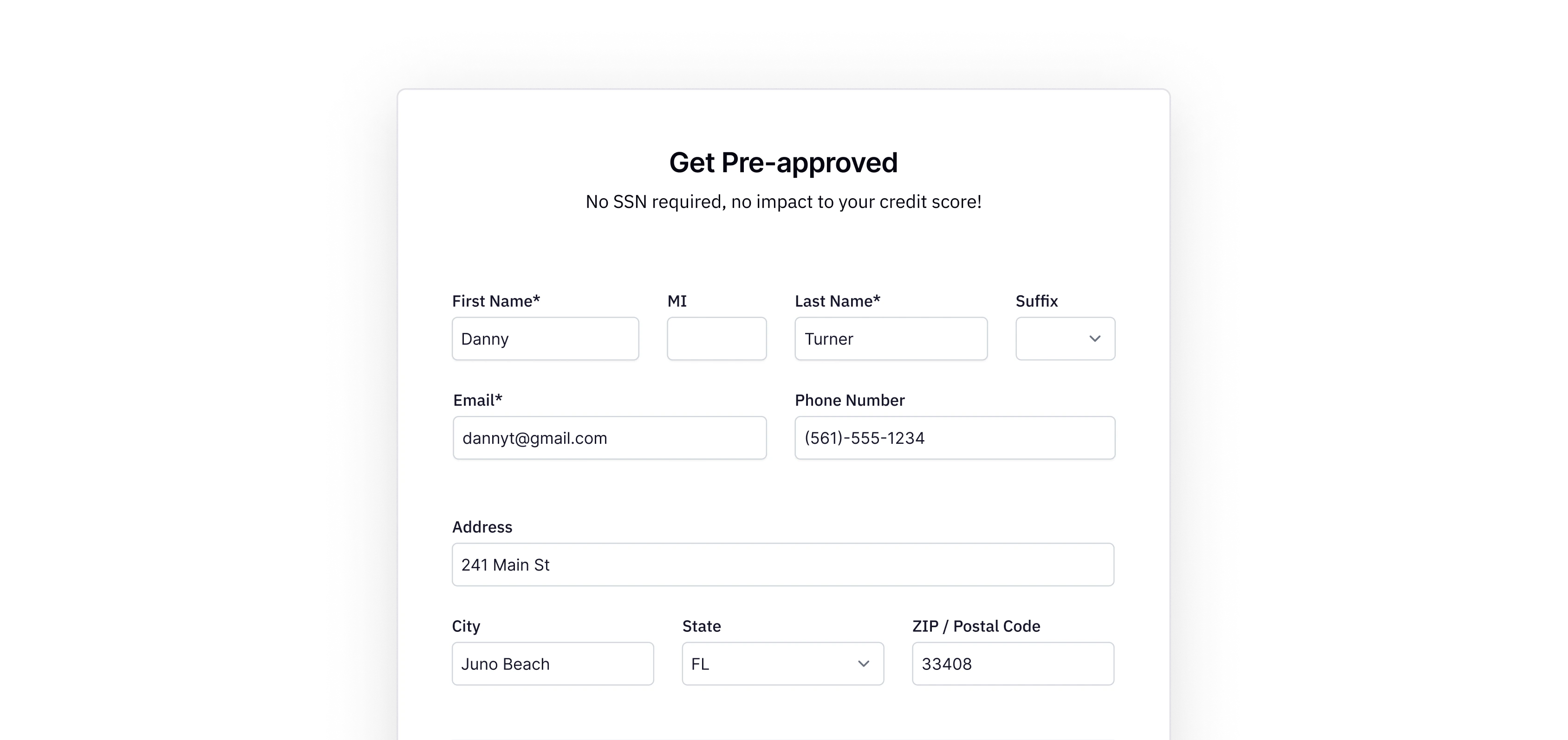
Danny is looking to buy a new car. He wants to know how much he can afford and what his interest
rate will be. He goes to the Drivly website and fills out a form to get pre-approved.
To complete this scenario, you will need to:
1. [Install Dependencies](#install-dependencies)
2. [Create a Schema](#create-a-schema)
3. [Setup the SDK](#setup-the-sdk)
4. [Create a Pre-Approval](#create-a-pre-approval)
5. [*(Bonus) Update a Pre-Approval*](#update-a-pre-approval)
This guide uses The official [Drivly SDK](/developers/sdk) and
[Next.js](https://nextjs.org/docs/app/commerce/create-next-app).
***
## Install Dependencies
This guide uses some other dependencies along with the Drivly SDK. Let's install those dependencies.
```bash Yarn theme={null}
yarn add zod react-hook-form @hookform/resolvers
```
```bash NPM theme={null}
npm install zod react-hook-form @hookform/resolvers
```
```bash PnPM theme={null}
pnpm install zod react-hook-form @hookform/resolvers
```
```bash Bun theme={null}
bun add zod react-hook-form @hookform/resolvers
```
***
## Create a Schema
Next, we will use Zod to create a schema for the Pre-Approval. This schema will be used to validate the form data before we send it to the server.
```javascript preapproval.schema.ts theme={null}
import * as z from 'zod'
import { states } from './states'
export const PreApprovalSchema = z.object({
firstName: z.string(),
middleInitial: z.optional(z.string()),
lastName: z.string(),
suffix: z.optional(z.enum(['', 'JR', 'SR', 'II', 'III', 'IV']).nullable()),
email: z.string().email(),
phone: z.string(),
address: z.string(),
city: z.string(),
state: z.enum(states),
zip: z.string(),
})
export type PreApprovalSchema = z.infer
```
```jsx states.ts theme={null}
export const states = [
'AA', 'AE', 'AK', 'AL', 'AR', 'AS', 'AZ', 'CA', 'CO', 'CT', 'DC', 'DE', 'FL',
'FM', 'GA', 'GU', 'HI', 'IA', 'ID', 'IL', 'IN', 'KS', 'KY', 'LA', 'MA', 'MD',
'ME', 'MH', 'MI', 'MN', 'MO', 'MP', 'MS', 'MT', 'NC', 'ND', 'NE', 'NH', 'NJ',
'NM', 'NV', 'NY', 'OH', 'OK', 'OR', 'PA', 'PR', 'PW', 'RI', 'SC', 'SD', 'TN',
'TX', 'UT', 'VA', 'VI', 'VT', 'WA', 'WI', 'WV', 'WY', 'AP'
] as const
```
The `states` is an array of all the states that are defined in the SDK's exported `interface
PreApproval`. You will need to either create this array or cast the value of `state` from `string`
to `as PreApproval['state']` to ensure that value is valid for the SDK.
***
## Setup the SDK
Let's create a singleton instance of the SDK and export it for use in our application. We will use the `DRIVLY_API_KEY` and will start in `sandbox`.
```javascript sdk.ts theme={null}
import { SDK } from '@drivly/commerce'
export const sdk = SDK({
apiKey: process.env.DRIVLY_API_KEY as string,
environment: 'sandbox',
})
```
***
## Create a Pre-Approval
Now that we have the schema and the SDK setup, we can create the form that will be used to collect Danny's information. We will use `react-hook-form` to handle the form state and `@hookform/resolvers` to use the Zod schema to validate the form data.
```tsx PreApprovalForm.tsx theme={null}
import { PreApprovalSchema } from './PreApprovalSchema'
import { zodResolver } from '@hookform/resolvers/zod'
import { useForm } from 'react-hook-form'
import { createPreApproval } from './preapproval.action' // server action
export default function PreApprovalForm() {
const form = useForm({
resolver: zodResolver(PreApprovalSchema),
defaultValues: {
firstName: '',
middleInitial: '',
lastName: '',
suffix: undefined,
email: '',
phone: '',
address: '',
city: '',
state: '',
zip: '',
},
})
const onSubmit = async (data: PreApprovalSchema) => {
const result = await createPreApproval(data)
console.log(result.message)
}
return
}
```
**Server Side Integration:** Server Actions, Serverless Function, or API Route
> We will use Server Actions for this example.
Let's create a server action that uses the SDK to create Danny's pre-approval.
```javascript preapproval.action.ts theme={null}
'use server'
import { PreApproval } from '@drivly/commerce'
import { sdk } from './sdk'
export const createPreApproval = async (
data: Omit
) => {
try {
const result = await sdk?.commerce.preApprovals.create({ doc: data })
console.log('Pre-approval created:', result)
} catch (error) {
console.error(error)
}
}
```
***
## Update a Pre-Approval
If we need to update or add information to their pre-approval, we can use the `updatePreApproval` action.
```javascript preapproval.action.ts theme={null}
'use server'
import { UpdatePreApprovalParams } from './shared.param.types'
import { sdk } from './sdk'
export const updatePreApproval = async (params: UpdatePreApprovalParams) => {
try {
const { id, income } = params
const update = await sdk?.commerce.preApprovals.updateById({
id,
patch: { income },
})
console.log('Pre-approval updated:', update)
} catch (error) {
console.error(error)
}
}
```
```javascript shared.param.types.ts theme={null}
import { PreApproval } from '@drivly/commerce'
export interface UpdatePreApprovalParams {
id: string
income: Pick
path: string
}
```
Income verification could be needed for the pre-approval process.
***
## Conclusion
Danny can now fill out the form and get pre-approved for a loan. We can then use the `preApprovalId` to access his pre-approval. This will allow you to show him cars that he can afford and give him an idea of what his interest rate will be.
***
## Next Steps
Ready to get started with Pre-Approvals?
Explore the Pre-Approval API to find, create, and manage pre-approvals.
## Prerequisites
Before diving into the integration process, ensure you have the following:
1. [Sign up](https://drivly.typeform.com/applyforaccess) for a Drivly account
2. Create a [DRIVLY\_API\_KEY](/developers/auth)
3. Have a basic understanding of REST APIs
4. A secure environment for handling sensitive data
5. Install the [Drivly SDK](/developers/sdk/overview)
```bash Yarn theme={null}
yarn add @drivly/commerce
```
```bash NPM theme={null}
npm install @drivly/commerce
```
```bash PnPM theme={null}
pnpm install @drivly/commerce
```
```bash Bun theme={null}
bun add @drivly/commerce
```
```bash CDN theme={null}
```
The SDK should be used on the Server to avoid leaking API keys
***
## Overview
The concept of pre-approvals is to allow a user to get pre-approved for a loan before they start shopping for a car. This allows the user to know how much they can afford and what their interest rate will be. This is a great way to get users to commit to a purchase.
Danny is looking to buy a new car. He wants to know how much he can afford and what his interest
rate will be. He goes to the Drivly website and fills out a form to get pre-approved.
To complete this scenario, you will need to:
1. [Install Dependencies](#install-dependencies)
2. [Create a Schema](#create-a-schema)
3. [Setup the SDK](#setup-the-sdk)
4. [Create a Pre-Approval](#create-a-pre-approval)
5. [*(Bonus) Update a Pre-Approval*](#update-a-pre-approval)
This guide uses The official [Drivly SDK](/developers/sdk) and
[Next.js](https://nextjs.org/docs/app/commerce/create-next-app).
***
## Install Dependencies
This guide uses some other dependencies along with the Drivly SDK. Let's install those dependencies.
```bash Yarn theme={null}
yarn add zod react-hook-form @hookform/resolvers
```
```bash NPM theme={null}
npm install zod react-hook-form @hookform/resolvers
```
```bash PnPM theme={null}
pnpm install zod react-hook-form @hookform/resolvers
```
```bash Bun theme={null}
bun add zod react-hook-form @hookform/resolvers
```
***
## Create a Schema
Next, we will use Zod to create a schema for the Pre-Approval. This schema will be used to validate the form data before we send it to the server.
```javascript preapproval.schema.ts theme={null}
import * as z from 'zod'
import { states } from './states'
export const PreApprovalSchema = z.object({
firstName: z.string(),
middleInitial: z.optional(z.string()),
lastName: z.string(),
suffix: z.optional(z.enum(['', 'JR', 'SR', 'II', 'III', 'IV']).nullable()),
email: z.string().email(),
phone: z.string(),
address: z.string(),
city: z.string(),
state: z.enum(states),
zip: z.string(),
})
export type PreApprovalSchema = z.infer
```
```jsx states.ts theme={null}
export const states = [
'AA', 'AE', 'AK', 'AL', 'AR', 'AS', 'AZ', 'CA', 'CO', 'CT', 'DC', 'DE', 'FL',
'FM', 'GA', 'GU', 'HI', 'IA', 'ID', 'IL', 'IN', 'KS', 'KY', 'LA', 'MA', 'MD',
'ME', 'MH', 'MI', 'MN', 'MO', 'MP', 'MS', 'MT', 'NC', 'ND', 'NE', 'NH', 'NJ',
'NM', 'NV', 'NY', 'OH', 'OK', 'OR', 'PA', 'PR', 'PW', 'RI', 'SC', 'SD', 'TN',
'TX', 'UT', 'VA', 'VI', 'VT', 'WA', 'WI', 'WV', 'WY', 'AP'
] as const
```
The `states` is an array of all the states that are defined in the SDK's exported `interface
PreApproval`. You will need to either create this array or cast the value of `state` from `string`
to `as PreApproval['state']` to ensure that value is valid for the SDK.
***
## Setup the SDK
Let's create a singleton instance of the SDK and export it for use in our application. We will use the `DRIVLY_API_KEY` and will start in `sandbox`.
```javascript sdk.ts theme={null}
import { SDK } from '@drivly/commerce'
export const sdk = SDK({
apiKey: process.env.DRIVLY_API_KEY as string,
environment: 'sandbox',
})
```
***
## Create a Pre-Approval
Now that we have the schema and the SDK setup, we can create the form that will be used to collect Danny's information. We will use `react-hook-form` to handle the form state and `@hookform/resolvers` to use the Zod schema to validate the form data.
```tsx PreApprovalForm.tsx theme={null}
import { PreApprovalSchema } from './PreApprovalSchema'
import { zodResolver } from '@hookform/resolvers/zod'
import { useForm } from 'react-hook-form'
import { createPreApproval } from './preapproval.action' // server action
export default function PreApprovalForm() {
const form = useForm({
resolver: zodResolver(PreApprovalSchema),
defaultValues: {
firstName: '',
middleInitial: '',
lastName: '',
suffix: undefined,
email: '',
phone: '',
address: '',
city: '',
state: '',
zip: '',
},
})
const onSubmit = async (data: PreApprovalSchema) => {
const result = await createPreApproval(data)
console.log(result.message)
}
return
}
```
**Server Side Integration:** Server Actions, Serverless Function, or API Route
> We will use Server Actions for this example.
Let's create a server action that uses the SDK to create Danny's pre-approval.
```javascript preapproval.action.ts theme={null}
'use server'
import { PreApproval } from '@drivly/commerce'
import { sdk } from './sdk'
export const createPreApproval = async (
data: Omit
) => {
try {
const result = await sdk?.commerce.preApprovals.create({ doc: data })
console.log('Pre-approval created:', result)
} catch (error) {
console.error(error)
}
}
```
***
## Update a Pre-Approval
If we need to update or add information to their pre-approval, we can use the `updatePreApproval` action.
```javascript preapproval.action.ts theme={null}
'use server'
import { UpdatePreApprovalParams } from './shared.param.types'
import { sdk } from './sdk'
export const updatePreApproval = async (params: UpdatePreApprovalParams) => {
try {
const { id, income } = params
const update = await sdk?.commerce.preApprovals.updateById({
id,
patch: { income },
})
console.log('Pre-approval updated:', update)
} catch (error) {
console.error(error)
}
}
```
```javascript shared.param.types.ts theme={null}
import { PreApproval } from '@drivly/commerce'
export interface UpdatePreApprovalParams {
id: string
income: Pick
path: string
}
```
Income verification could be needed for the pre-approval process.
***
## Conclusion
Danny can now fill out the form and get pre-approved for a loan. We can then use the `preApprovalId` to access his pre-approval. This will allow you to show him cars that he can afford and give him an idea of what his interest rate will be.
***
## Next Steps
Ready to get started with Pre-Approvals?
Explore the Pre-Approval API to find, create, and manage pre-approvals.