> ## Documentation Index
> Fetch the complete documentation index at: https://docs.driv.ly/llms.txt
> Use this file to discover all available pages before exploring further.
# Back Office & Contracting
> Learn how to use Back Office & Contracting workflows.
export const HeroContent = ({children, withGrid}) =>
{withGrid &&
}
{children}
;
## Overview
The Back Office & Contracting API provides a set of tools and functionalities to streamline the creation, signing, and management of legal documents related to vehicle sales and transactions. It enables businesses to automate and digitize their contracting processes, ensuring compliance with legal requirements and standards.
***
## Workflows
The Back Office & Contracting API facilitates a variety of workflows related to vehicle sales and transactions, including: `Document Generation`, `eContracting`, `Power of Attorney`, `Notary Services` and `Document Archive`.
### Document Generation
Document Generation allows businesses to create custom legal documents, such as sales contracts, purchase agreements, and warranty documents, based on predefined templates and data inputs. This workflow streamlines the document creation process, ensuring consistency and accuracy in the content and format of legal documents.
### eContracting
Enables businesses to electronically sign and execute legal documents, such as sales contracts, lease agreements, and financing contracts. This workflow eliminates the need for physical signatures and paper-based processes, making it faster and more convenient to finalize transactions.
### Power of Attorney
A POA is a legal document that allows an individual (the principal) to appoint another person (the agent or attorney-in-fact) to act on their behalf to sign documents, make decisions, or conduct business related to the principal's vehicle.
A Motor Vehicle Power of Attorney typically includes:
| Field | Description |
| ----------------- | -------------------------------------------------------------------- |
| **Principal** | The person granting the power to act on their behalf. |
| **Agent** | The person authorized to act on behalf of the principal. |
| **Vehicle Info** | Details about the vehicle, such as the make, model, year, and VIN. |
| **Scope of Auth** | The specific powers granted to the agent, such as signing documents. |
| **Duration** | The period during which the Power of Attorney is valid. |
| **Signatures** | Signatures of the principal, agent, and any witnesses. |
Find the Vehicle Identification Number (VIN) for the vehicle you want to purchase.
```plaintext theme={null}
WP0AF2A99KS165242
```
| Parameter | Description | Required |
| --------- | --------------------------------------------------------- | :------: |
| `name` | The name of the person granting the power of attorney. | Yes |
| `address` | The address of the person granting the power of attorney. | Yes |
| `brand` | Company brand name (White label) | No |
| `lawsOf` | The state laws that govern the power of attorney. | No |
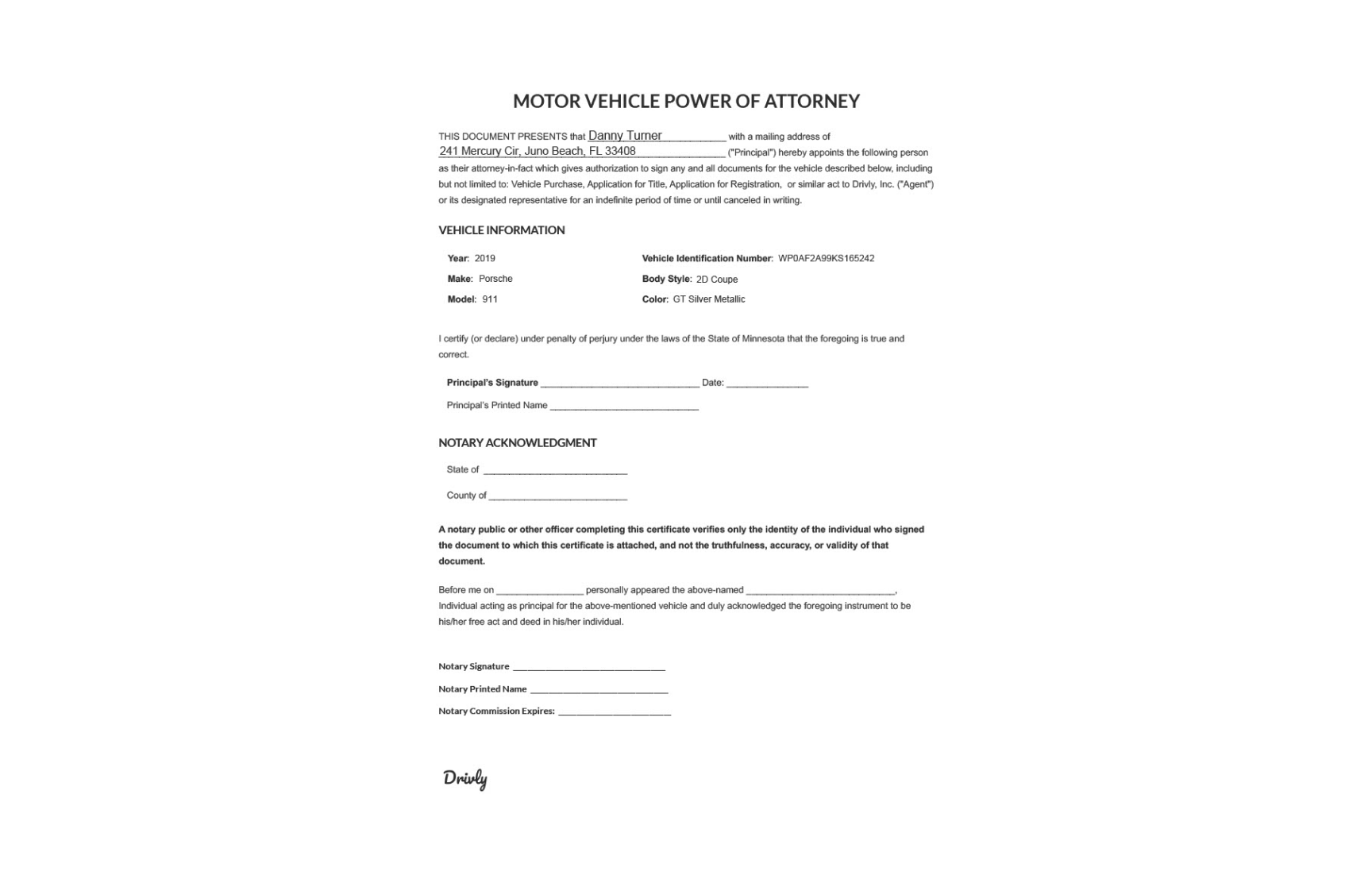
Use the following URL template to generate a Power of Attorney form for the specified vehicle and person:
`https://poa.vin/{VIN}?name={name}&address={address}`
```plaintext Actual Values theme={null}
https://poa.vin/WP0AF2A99KS165242?name=Danny+Turner&address=241+Mercury+Cir,+Juno+Beach,+FL+33408
```
Spaces in the `name` and `address` should be replaced with `+` or `%20`.
The API will return a PDF document containing the Power of Attorney form with the provided information.
 ### Notary Services
Provides a secure and convenient way to notarize legal documents. This workflow ensures that all documents are legally binding and compliant with notary requirements.
Need to notarize the Power of Attorney? Check out the Notarize POA workflow below.
The Notarize POA workflow is similar to the Create POA workflow but includes an additional step to notarize the Power of Attorney form.
Use the following URL template to generate a notarized Power of Attorney form for the specified vehicle and person:
`https://notarize.poa.vin/{VIN}?name={name}&address={address}`
```plaintext Actual Values theme={null}
https://notarize.poa.vin/WP0AF2A99KS165242?name=Danny+Turner&address=241+Mercury+Cir,+Juno+Beach,+FL+33408
```
Spaces in the `name` and `address` should be replaced with `+` or `%20`.
Share the generated URL with the person granting the power of attorney. When they open the link, they will be redirected to an online notary service to complete the notarization process.
The person granting the power of attorney can digitally sign the document and have it notarized online. The notarized Power of Attorney form will be securely stored and shared with all parties involved.
### Document Archive
Provides a secure and centralized repository for storing and managing legal documents related to vehicle sales and transactions. This workflow ensures that all documents are easily accessible, searchable, and compliant with data protection regulations.
### Notary Services
Provides a secure and convenient way to notarize legal documents. This workflow ensures that all documents are legally binding and compliant with notary requirements.
Need to notarize the Power of Attorney? Check out the Notarize POA workflow below.
The Notarize POA workflow is similar to the Create POA workflow but includes an additional step to notarize the Power of Attorney form.
Use the following URL template to generate a notarized Power of Attorney form for the specified vehicle and person:
`https://notarize.poa.vin/{VIN}?name={name}&address={address}`
```plaintext Actual Values theme={null}
https://notarize.poa.vin/WP0AF2A99KS165242?name=Danny+Turner&address=241+Mercury+Cir,+Juno+Beach,+FL+33408
```
Spaces in the `name` and `address` should be replaced with `+` or `%20`.
Share the generated URL with the person granting the power of attorney. When they open the link, they will be redirected to an online notary service to complete the notarization process.
The person granting the power of attorney can digitally sign the document and have it notarized online. The notarized Power of Attorney form will be securely stored and shared with all parties involved.
### Document Archive
Provides a secure and centralized repository for storing and managing legal documents related to vehicle sales and transactions. This workflow ensures that all documents are easily accessible, searchable, and compliant with data protection regulations.